

The Anonymous wrote this text message:
"RSS.ORG LEAKED! #Anonymous #CyberLeaks
Hi Brothers and Sisters, there is the Leaked data from rss.org. The terrorist group based on India!
Download: http://www.mediafire.com/file/92tmvobk8xg2va4/LEAKED+rss.org+.rar
Password is: opindia
There are documents , admins informations , admins computers and more. They got explosed By Anonymous!
Spread it.
This hack is part of #OpIndia, more leaks is coming
We are: Anonymous Ghost , Anonymous Greece, MinionGhost, AnonGhost Philippines.
Best regards, Anonymous! CyberLeaks"
So, the Data Leak from RSS is public? Yes, and anyone can download it. Its a rar file from mediafire
The leak contains the following files:
- PDF Documents from Rss.org website
- All usernames + Last names
- rss.org computers ( Windows 7 and Vista )
- Admin informations
Anonymous also claims to hack all computers into rss.org after the data leakage.
India RSS website hacked by Anonymous
By Unknown

The arrest — first reported by Motherboard — took place yesterday, August 2, after the DEF CON security conference.
According to an official indictment, authorities arrested MalwareTech — real name Marcus Hutchins, 23, from the UK — for creating and updating Kronos, a well-known banking trojan that uses a technique called web injects to insert fake login pages for online banking portals in various browsers.
MalwareTech allegedly created Kronos in 2014
Kronos was first spotted in July 2014 and was the last time seen active in June 2016. In July 2014, Kronos was available for sale on a major Russian underground forum for a price tag of $7,000.
The official indictment accuses MalwareTech of creating and updating the Kronos trojan, while his accomplice — currently unnamed — advertised the malware on hacking forums (for $3,000) and AlphaBay (for $2,000).
US officials seized the servers of the AlphaBay Dark Web marketplace on July 4, 2017. The filing date on the indictment is July 11, 2017.
According to the indictment, the two accomplices made at least one successful sale of Kronos on AlphaBay, yet again revealing that US authorities most likely used the seized AlphaBay data to verify and confirm the purchase.
MalwareTech stopped the WannaCry outbreak
In May 2017, MalwareTech became a world-famous hero when he stopped the spread of the WannaCry ransomware.
MalwareTech's arrest shocked the security community. Fellow security researchers have a hard time believing the accusations. Many believe MalwareTech was framed or investigators might have screwed up their investigation [1, 2, 3, 4].

MalwareTech's arrest also caused a ruckus in the infosec industry as friends couldn't pin where he was detained and provide him with the proper legal counsel.
At the time of his arrest, MalwareTech was an employee of Kryptos Logic, a UK-based cyber-security company.
Bleepingcomputer
MalwareTech Arrested Because Creating Kronos Banking Trojan
By Unknown

Marcus Hutchins, operates under the alias MalwareTech on Twitter, was detained by the FBI in the state of Nevada, a friend of Hutchins confirmed Motherboard.
At the time of writing, it is unclear why the Internet's 'accidental hero' has been detained by the FBI, but his arrest has sparked an endless debate in the security community.
Hutchins became famous over two months ago when the WannaCry ransomware began hitting businesses, organisations and individuals across the world, and he accidentally halted its global spread by registering a domain name hidden in the malware.
hxxp://www[.]iuqerfsodp9ifjaposdfjhgosurijfaewrwergwea[.]com
Fortunately, Hutchins registered this domain in question and created a sinkhole–tactic researchers use to redirect traffic from the infected machines to a self-controlled system.
Hutchins is quite active on Twitter, but from last 24 hours, we have not seen any tweet from his account, which suggests the reports are likely correct.
Andrew Mabbitt, Hutchins’s friend has confirmed that he has currently been detained at FBI’s field office in Las Vegas. His friend is also asking for some legal help.
"His friends Andrew Mabbitt, Finally located @MalwareTechBlog, he's in the Las Vegas FBI field office. Can anyone provide legal representation?" Mabbitt tweeted.
Since both news came on the same day, some people have started making conspiracy theories about the involvement of both the events, though nothing is clear at this moment.
WannaCry was really bad, as the nasty ransomware forced the British NHS (National Health Service) to shut down hospitals and doctor's surgeries, and infected a Spanish telecommunications company and Russian mobile operator, among much more.
Even a month after its outbreak, the WannaCry ransomware was found infecting systems at Honda Motor Company, forcing its Japan-based factory to shut down its production, and 55 speed and traffic light cameras in Victoria, Australia.
The British National Crime Agency has confirmed an arrest of a British citizen but hasn't confirmed it is Hutchins.
Update: Marcus Hutchins Accused for Creating Banking Malware
According to a spokesperson from the U.S. Department of Justice Hutchins has been arrested by the FBI for "his role in creating and distributing the Kronos banking Trojan" between 2014-2015.
Kronos malware was distributed via emails with malicious attachments containing compromised Microsoft word documents and used to hijack credentials such as banking passwords to let attackers steal money with ease.
According to Hutchins indictment, shown below, he has been accused of six counts of hacking-related crimes along with another unnamed co-defendant allegedly involved in the development of Kronos malware.
In 2014, the Kronos banking malware was made available for purchase in a Russian underground forum for a price tag of $7,000, with even an option for users to test the malware for a week before buying it.
Last year researchers also discovered that this banking Trojan was used in 2015 campaign for distributing point-of-sale (POS) malware dubbed ScanPOS as the secondary payload.
The Hacker News
FBI Arrests Researcher Who Found 'Kill-Switch' to Stop Wannacry Ransomware
By Unknown

Security researchers have now discovered at least one group of cyber criminals that are attempting to give its banking Trojan the self-spreading worm-like capabilities that made recent ransomware attacks go worldwide.
The new version of credential stealing TrickBot banking Trojan, known as "1000029" (v24), has been found using the Windows Server Message Block (SMB)—that allowed WannaCry and Petya to spread across the world quickly.
TrickBot is a banking Trojan malware that has been targeting financial institutions across the world since last year.
The Trojan generally spreads via email attachments impersonating invoices from a large unnamed "international financial institution," but actually leads victims to a fake login page used to steal credentials.
Last week, researchers at Flashpoint, who've been continually tracking TrickBot activities and its targets, have discovered that the TrickBot Trojan has just been evolved to spread locally across networks via Server Message Block (SMB).
Since the new version of TrickBot is still being tested, the new features are not fully implemented by the hacking gang behind the Trojan. It also doesn't have the ability to randomly scan external IPs for SMB connections, unlike WannaCry which exploited a vulnerability dubbed EternalBlue.
Flashpoint researchers said the trojan is modified to scan domains for lists of vulnerable servers via the NetServerEnum Windows API and enumerate other computers on the network via Lightweight Directory Access Protocol (LDAP).
The new TrickBot variant can also be disguised as 'setup.exe' and delivered through a PowerShell script to spread through interprocess communication and download additional version of TrickBot onto shared drives.
According to the researchers, the latest discovery of new TrickBot variant provides an insight into what the operators behind the malware might be using in the near-future.
"Flashpoint assesses with moderate confidence that the Trickbot gang will likely continue to be a formidable force in the near term," said Vitali Kremez, director of Research at Flashpoint.
"Even though the worm module appears to be rather crude in its present state, it's evident that the Trickbot gang learned from the global ransomware worm-like outbreaks of WannaCry and 'NotPetya' and is attempting to replicate their methodology."
In order to safeguard against such malware infection, you should always be suspicious of unwanted files and documents sent over an email and should never click on links inside them unless verifying the source.
To always have a tight grip on your valuable data, keep a good backup routine in place that makes their copies to an external storage device that is not always connected to your PC.
Moreover, make sure that you run an effective anti-virus security suite on your system, and keep it up-to-date.
The Hacker News
WannaCry Inspires Banking Trojan to Add Self-Spreading Ability
By Unknown

Security researchers have discovered that one of the most dangerous Android banking Trojan families has now been modified to add a keylogger to its recent strain, giving attackers yet another way to steal victims sensitive data.
Kaspersky Lab's Senior malware analyst Roman Unuchek spotted a new variant of the well-known Android banking Trojan, dubbed Svpeng, in the mid of last month with a new keylogger feature, which takes advantage of Android's Accessibility Services.
Trojan Exploits 'Accessibility Services' to Add Keylogger
Yes, the keylogger added in the new version of Svpeng takes advantage of Accessibility Services — an Android feature that provides users alternative ways to interact with their smartphone devices.
This change makes the Svpeng Trojan able not only to steal entered text from other apps installed on the device and log all keystrokes, but also to grant itself more permissions and rights to prevent victims from uninstalling the Trojan.
In November last year, the Svpeng banking trojan infected over 318,000 Android devices across the world over the span of only two months with the help of Google AdSense advertisements that was abused to spread the malicious banking Trojan.
Over a month ago, researchers also discovered another attack taking advantage of Android's Accessibility Services, called Cloak and Dagger attack, which allows hackers to silently take full control of the infected devices and steal private data.
If You Are Russian, You Are Safe!
Although the new variant of the Svpeng malware is not yet widely deployed, the malware has already hit users in 23 countries over the course of a week, which include Russia, Germany, Turkey, Poland, and France.
But what's worth noticing is that, even though most infected users are from Russia, the new variant of Svpeng Trojan doesn't perform malicious actions on those devices.
According to Unuchek, after infecting the device, the Trojan first checks the device's language. If the language is Russian, the malware prevents further malicious tasks—this suggests the criminal group behind this malware is Russian, who are avoiding to violate Russian laws by hacking locals.
How 'Svpeng' Trojan Steals Your Money
Unuchek says the latest version of Svpeng he spotted in July was being distributed through malicious websites that disguised as a fake Flash Player.
Once installed, as I have mentioned above, the malware first checks for the device language and, if the language is not Russian, asks the device to use Accessibility Services, which opens the infected device to a number of dangerous attacks.
With having access to Accessibility Services, the Trojan grants itself device administrator rights, displays an overlay on the top of legitimate apps, installs itself as a default SMS app, and grants itself some dynamic permissions, such as the ability to make calls, send and receive SMS, and read contacts.
Additionally, using its newly-gained administrative capabilities, the Trojan can block every attempt of victims to remove device administrator rights—thereby preventing the uninstallation of the malware.
Using accessibility services, Svpeng gains access to the inner working of other apps on the device, allowing the Trojan to steal text entered on other apps and take screenshots every time the victim presses a button on the keyboard, and other available data.
"Some apps, mainly banking ones, do not allow screenshots to be taken when they are on top. In such cases, the Trojan has another option to steal data – it draws its phishing window over the attacked app," Unuchek says.
"It is interesting that, in order to find out which app is on top, it uses accessibility services too."
All the stolen information is then uploaded to the attackers' command and control (C&C) server. As part of his research, Unuchek said he managed to intercept an encrypted configuration file from the malware's C&C server.
Decrypting the file helped him find out some of the websites and apps that Svpeng targets, as well as help him obtain a URL with phishing pages for both the PayPal and eBay mobile apps, along with links for banking apps from the United Kingdom, Germany, Turkey, Australia, France, Poland, and Singapore.
Besides URLs, the file also allows the malware to receive various commands from the C&C server, which includes sending SMS, collecting information such as contacts, installed apps and call logs, opening the malicious link, gathering all SMS from the device, and stealing incoming SMS.
The Evolution of 'Svpeng' Android Banking Malware
Researchers at Kaspersky Lab initially discovered the Svpeng Android banking malware trojan back in 2013, with primary capability—Phishing.
Back in 2014, the malware was then modified to add a ransomware component that locked victim's device (by FBI because they visited sites containing pornography) and demanded $500 from users.
The malware was among the first to begin attacking SMS banking, use phishing web pages to overlay other apps in an effort to steal banking credentials and to block devices and demand money.
In 2016, cyber criminals were actively distributing Svpeng via Google AdSense using a vulnerability in the Chrome web browser, and now abusing Accessibility Services, which possibly makes Svpeng the most dangerous mobile banking malware family to date that can steal almost anything—from your Facebook credentials to your credit cards and bank accounts.
How to Protect Your Smartphone From Hackers
With just Accessibility Services, this banking Trojan gains all necessary permissions and rights to steal lots of data from the infected devices.
The malicious techniques of the Svpeng malware even work on fully-updated Android devices with the latest Android version and all security updates installed, so it is little users can do in order to protect themselves.
There are standard protection measures you need to follow to remain unaffected:
- Always stick to trusted sources, like Google Play Store and the Apple App Store, but only from trusted and verified developers.
- Most importantly, verify app permissions before installing apps. If any app is asking more than what it is meant for, just do not install it.
- Do not download apps from third party sources, as most often such malware spreads via untrusted third-parties.
- Avoid unknown and unsecured Wi-Fi hotspots and Keep your Wi-Fi turned OFF when not in use.
- Never click on links provided in an SMS, MMS or email. Even if the email looks legit, go directly to the website of origin and verify any possible updates.
- Install a good antivirus app that can detect and block such malware before it can infect your device, and always keep the app up-to-date.
Source: The Hacker News
Dangerous Mobile Banking Trojan Gets 'Keylogger' to Steal Everything
By Unknown

That’s not all, hackers who have claimed responsibility for the hack are threatening to leak more data in coming days. So far, according to a report from Entertainment Weekly, hackers have sent emails to several media outlets claiming that they have stolen 1.5 terabytes of data from HBO’s system.
Entertainment Weekly noted that the data contains upcoming episode of Ballers and Room 104 (which has apparently been leaked online) and files which seem related to the fourth episode of Game of Thrones which will be aired next week.
The email sent to the media outlets said that:
“Hi to all mankind. The greatest leak of cyber space era is happening. What’s its name? Oh I forget to tell. Its HBO and Game of Thrones……!!!!!! You are lucky to be the first pioneers to witness and download the leak. Enjoy it & spread the words. Whoever spreads well, we will have an interview with him. HBO is falling.”
HBO, on the other hand, has acknowledged the breach. However, it doesn’t confirm if Game of Thrones related data was stolen or not or what kind of data was stolen by the hackers.
“HBO recently experienced a cyber incident, which resulted in the compromise of proprietary information,” HBO network said in a statement.
[…]
“We immediately began investigating the incident and are working with law enforcement and outside cyber security firms. Data protection is a top priority at HBO, and we take seriously our responsibility to protect the data we hold.”
It is unclear who is behind this breach and why did they choose to target HBO. In case if hackers have access to such a massive trove of data it will be devastating for the network. Remember, in December 2014; Sony suffered a similar breach in which a hacking group going by the handle of “Guardians of Peace” (GOP) stole a massive amount of data from Sony’s servers and ended up leaking movies and financial information of the company.
In an email alert sent by HBO’s chairman and CEO Richard Plepler, it was stated that:
The problem before us is unfortunately all too familiar in the world we now find ourselves a part of. As has been the case with any challenge we have ever faced, I have absolutely no doubt that we will navigate our way through this successfully.”
Source: Hack Read
HBO Hacked – Upcoming Game of Thrones Episodes and Data Leaked
By Unknown

China is well known for its online censorship and surveillance tactics, but earlier today news broke that Apple has removed all virtual private network (VPN) apps from App Store in China. This means Apple users in China can not avail online anonymity anymore and their privacy is at high risk.
ExpressVPN, a British Virgin Islands-based VPN provider, was the first one to notice the issue when their app was removed from the App Store. Upon further digging, ExpressVPN discovered that Apple had removed all major VPN apps from the App Store.
In their blog post, ExpressVPN wrote that:
“We’re disappointed in this development, as it represents the most drastic measure the Chinese government has taken to block the use of VPNs to date, and we are troubled to see Apple aiding China’s censorship efforts. ExpressVPN strongly condemns these measures, which threaten free speech and civil liberties.”
A screenshot shared by ExpressVPN shows Apple’s notification about the removal of their app from the Store.

Another VPN service provider VyprVPN told HackRead that their app has also been removed from the app store. In their blog post, VyprVPN wrote that their “VPN support is built into the iOS operating system so users can continue to use VyprVPN on iOS without the App by using our manual iOS VPN setup instructions.”
Another good news is that those users who have set up their billing address outside of China can still download and use the VPN apps from other territories.
Just last week, it was reported that China is forcing its Muslim citizens to install spyware on their devices so the government authorities can spy and monitor their online activities.
This came as no surprise since the search engine giant Google, and social media giant Facebook is already banned in China. However, the users outside of China have heavily criticized Apple for aiding China in its war against online privacy.
Source: Hack Read
Apple has removed all major VPN apps from Chinese App Store
By Unknown

WikiLeaks has just published a new set of classified documents linked to another CIA project, dubbed 'Imperial,' which reveals details of at least three CIA-developed hacking tools and implants designed to target computers running Apple Mac OS X and different flavours of Linux operating systems.
If you are a regular reader of THN, you must be aware that this latest revelation by the whistleblower organisation is the part of an ongoing CIA-Vault 7 leaks, marking it as the 18th batch in the series.
If you are unaware of the Vault 7 leaks, you can head on to the second of this article for having a brief look on all the leaks at once.
Achilles — Tool to Backdoor Mac OS X Disk Images
Dubbed Achilles, the hacking tool allows CIA operators to combine malicious Trojan applications with a legitimate Mac OS app into a disk image installer (.DMG) file.
The binding tool, the shell script is written in Bash, gives the CIA operators "one or more desired operator specified executables" for a one-time execution.
As soon as an unsuspecting user downloads an infected disk image on his/her Apple computer, opens and installs the software, the malicious executables would also run in the background.
Afterwards, all the traces of the Achilles tool would be "removed securely" from the downloaded application so that the file would "exactly resemble" the original legitimate app, un-trojaned application, making it hard for the investigators and antivirus software to detect the initial infection vector.
Achilles v1.0, developed in 2011, was only tested on Mac OS X 10.6, which is Apple's Snow Leopard operating system that the company launched in 2009.
SeaPea — Stealthy Rootkit For Mac OS X Systems
The second hacking tool, called SeaPea, is a Mac OS X Rootkit that gives CIA operators stealth and tool launching capabilities by hiding important files, processes and socket connections from the users, allowing them to access Macs without victims knowledge.
Developed in 2011, the Mac OS X Rootkit works on computers running then-latest Mac OS X 10.6 (Snow Leopard) Operating System (32- or 64-bit Kernel Compatible) and Mac OS X 10.7 (Lion) Operating System.
The rootkit requires root access to be installed on a target Mac computer and cannot be removed unless the startup disk is reformatted or the infected Mac is upgraded to the next version of the operating system.
Aeris — An Automated Implant For Linux Systems
The third CIA hacking tool, dubbed Aeris, is an automated implant written in C programming language that is specifically designed to backdoor portable Linux-based Operating Systems, including Debian, CentOS, Red Hat — along with FreeBSD and Solaris.
Aeris is a builder that CIA operators can use to generate customised impacts, depending upon their covert operation.
"It supports automated file exfiltration, configurable beacon interval and jitter, stand-alone and Collide-based HTTPS LP support and SMTP protocol support — all with TLS encrypted communications with mutual authentication,"
"It's compatible with the NOD Cryptographic Specification and provides structured command and control that's similar to that used by several Windows implants."
Previous Vault 7 CIA Leaks
Since March, the whistle-blowing group has published 18 batches of "Vault 7" series, which includes the latest and last week leaks, along with the following batches:
- Highrise Project — the alleged CIA project that allowed the spying agency to stealthy collect and forwarded stolen data from compromised smartphones to its server through SMS messages.
- BothanSpy and Gyrfalcon — two alleged CIA implants that allowed the spying agency to intercept and exfiltrate SSH credentials from targeted Windows and Linux operating systems using different attack vectors.
- OutlawCountry – An alleged CIA project that allowed it to hack and remotely spy on computers running the Linux operating systems.
- ELSA – the alleged CIA malware that tracks geo-location of targeted PCs and laptops running the Microsoft Windows operating system.
- Brutal Kangaroo – A tool suite for Microsoft Windows used by the agency to targets closed networks or air-gapped computers within an organization or enterprise without requiring any direct access.
- Cherry Blossom – An agency's framework, basically a remotely controllable firmware-based implant, used for monitoring the Internet activity of the targeted systems by exploiting vulnerabilities in Wi-Fi devices.
- Pandemic – A CIA's project that allowed the agency to turn Windows file servers into covert attack machines that can silently infect other computers of interest inside a targeted network.
- Athena – A CIA's spyware framework that has been designed to take full control over the infected Windows PCs remotely, and works against every version of Microsoft's Windows operating systems, from Windows XP to Windows 10.
- AfterMidnight and Assassin – Two alleged CIA malware frameworks for the Microsoft Windows platform that has been designed to monitor and report back actions on the infected remote host computer and execute malicious actions.
- Archimedes – Man-in-the-middle (MitM) attack tool allegedly created by the CIA to target computers inside a Local Area Network (LAN).
- Scribbles – A piece of software reportedly designed to embed 'web beacons' into confidential documents, allowing the agency to track insiders and whistleblowers.
- Grasshopper – Framework which allowed the spying agency to easily create custom malware for breaking into Microsoft's Windows and bypassing antivirus protection.
- Marble – Source code of a secret anti-forensic framework, basically an obfuscator or a packer used by the CIA to hide the actual source of its malware.
- Dark Matter – Hacking exploits the agency designed to target iPhones and Macs.
- Weeping Angel – Spying tool used by the agency to infiltrate smart TV's, transforming them into covert microphones.
- Year Zero – Alleged CIA hacking exploits for popular hardware and software.
Source: The Hacker News
3 New CIA-developed Hacking Tools For MacOS & Linux Exposed
By Unknown

IT security researchers at WhiteScope Billy Rios and Jonathan Butts have discovered a critical security flaw in the design of the software responsible for running a huge number of Internet connected car washes in the United States. The flaw can allow an attacker to gain remote access to the equipment and take control of the doors, including locking them and causing whatever damage possible.
Originally, Rios noted the flaws back in 2015, and since then his mission was to find as many devices as possible and analyze what they are exposing to the public web. This time, to take his findings to a new level both researchers came up with an exploit for the flaw and with the permission of a car wash owner they successfully targeted the system.
The problem exists in PDQ Vehicle Wash Systems, a brushless automated car wash system which is operated through a software that runs on Windows CE (Compact edition) and uses a mechanical arm to spray around the vehicle. It must be noted that Windows CE was initially released in 1996 making it a 20-year-old operating system which is not even supported by Microsoft anymore.
The system is protected with login credentials ( a username and a password) which are easy to guess – especially if the user has not changed them since it was installed or in simple words, researchers say default credentials are easy to guess.
Upon knowing the login details, researchers exploited the vulnerability and sent remote commands to the car wash system directing it to close the bay doors, trap the vehicle inside, spray as much water and soap they want and even smash the vehicle around which can be life threatening for some customers trapped inside.
In a conversation with MotherBoard, researchers explained that “We believe this to be the first exploit of a connected device that causes the device to physically attack someone.”
Both researchers demonstrated their findings at the Black Hat security conference in Las Vegas.
This is not the first time when Billy Rios and Jonathan Butts have identified critical vulnerabilities in an IoT system. Previously, both researchers identified life threatening vulnerabilities in hospital drug pumps which can be exploited to remotely administer a fatal dose of the medication to a patient.
A couple of months ago, the researchers also exposed another life threatening vulnerability in pacemakers which can be exploited to conduct potential ransomware attacks on a targeted device.
In this era of technology, almost everyone owns an IoT device. While there is a lot that can be done to secure smart devices, users must change the default credentials of their IoT devices and use a strong password instead. Furthermore, keep your operating system updated and use protection against cyber attacks. Stay safe online.
Understand what is PDQ Vehicle Wash Systems
Source: Hack Read
Hackers can take over Car Wash, trap you and smash your vehicle
By Unknown

Also, every other day we hear about some incidents of hacking of crypto currency exchange or digital wallets, in which hackers stole millions of dollars in Bitcoin or Ethereum.
The latest back-to-back series of thefts of Ethereum—one of the most popular and increasingly valuable cryptocurrencies—in which around half a billion dollars in total were stolen is the recent example of how much hackers are after crypto currencies.
It's obvious that after ripping off hundreds of thousands of cryptocurrencies from exchanges, wallets and ransomware victims, cyber criminals would not hold them in just digital form—the next step is to cash them out into real-world money.
But how do they cash out without getting caught by law enforcement?

If you are unaware, there are some crypto currency exchanges involved in money laundering, who are illegally-operating to help hackers and cyber criminals easily cash out their digital currencies without identifying them, i.e. anonymously.
According to a recent research paper presented by three Google researchers, more than 95% of all Bitcoin payments collected from ransomware victims have been cashed out via a Russian cryptocurrency exchange, called BTC-e, since 2014.
Interestingly, just two days before Google presentation, one of the founders of BTC-e exchange, Alexander Vinnik, was arrested by Greek police on charges of laundering over $4 Billion in Bitcoin for culprits.
"We uncover the cash-out points, tracking how the money exits the Bitcoin network, enabling the authorities to pick up the money trail using conventional financial tracing means," the trio researchers, Luca Invernizzi, Kylie McRoberts and Elie Bursztein said."
Key Points — Tracking Ransomware Payments

The researchers followed the step-by-step money trail and got a look at the evolving ecosystem of ransomware families, which already helped make cyber-thieves at least $25 Million in the last two years.
- Most Damaging Ransomware Families: According to the research, two families of ransomware strain helped hackers made most of the money — Locky and Cerber — while other variants are also starting to emerge.
- Criminals looted In Millions: Locky has been the overall biggest earner for hackers at $7.8 Million and was the first ransomware infection to earn above $1 million a month to date, while Cerber has made $6.9 million to date with consistently making more than $200,000 a month.
- Victim's Favorite Places to Buy Bitcoins: Obviously, victims also need BTC to pay out criminals, and most victims choose LocalBitcoins, Bithumb, and CoinBase to buy BTC, where 90% victims pay in a single transaction.
- How Criminals Cash Out Cryptocurrency: According to the research, more than 95% of all Bitcoin payments for ransomware were cashed out via BTC-e, a service operational since 2011.
- Criminals Renting Out Botnets: Cybercriminal gangs behind Dridex, Locky and Cerber have taken Necurs botnet—army of compromised machines—on rent to distribute their ransomware infections on a massive scale.
Google conducted the research in collaboration with the researchers from New York University, University of California San Diego and blockchain analyst firm Chainalysis.
When talking about BTC-e, the cryptocurrency exchange is believed to have been involved in cashing out Bitcoins stolen from the once-very popular Japanese bitcoin exchange Mt. Gox, which was shut down in 2014 following a massive series of mysterious robberies.
Source: The Hacker News
How Hackers Cash Out Thousands of Bitcoins Received in Ransomware Attacks
By Unknown

The investigation showed that the targeted department was related to personal loans whose computers were accessed by hackers due to a local third party provider working with the customer data. Therefore it is being assumed that the hackers were able to steal IBANs, names, cell phones, and addresses.
UniCredit is confident that passwords allowing customers to access their bank accounts or carry transactions were not obtained during the attack.
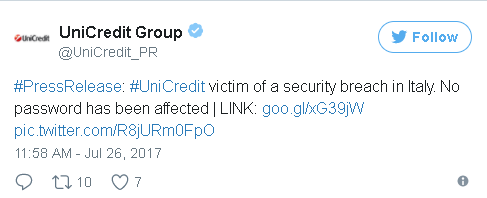
“UniCredit has launched an audit and has informed all the relevant authorities. In the morning, UniCredit will also file a claim with the Milan Prosecutor’s office. The bank has also taken immediate remedial action to close this breach,” said the press release.
The bank said the breach has been “closed” while it plans to contact the Milan Prosecutor’s office to file the claim. Those affected by the incident will also be contacted by the bank however those looking to talk to the bank directly can call on toll-free number 800 323285.
This is not the first time when an Italian institution has come under cyber attack. Previously, Anonymous claimed to steal and leak one terabyte of data from Expo 2015 tickets website to protest against the event.
Last year, Anonymous hackers claimed responsibility for hacking several Italian job portals and leaked a massive trove of their data to protect against new labor laws. While the biggest data breach from Italy came in 2015 when Milan based surveillance tool developers “Hacking Team” suffered a massive hack in which hackers leaked its source code online.
As for the UniCredit bank, none of the hacking groups have taken responsibility or claimed the hack anywhere including social media. Stay tuned for more information on the issue.
Source: https://www.hackread.com/
Italian Banking Giant UniCredit Hacked; 400,000 Customers Impacted
By Unknown

Today, most users surf the web unaware of the fact that websites and online services collect their personal information, including search histories, location, and buying habits and make millions by sharing your data with advertisers and marketers.
If this is not enough, then there are governments across the world conducting mass surveillance, and hackers and cyber criminals who can easily steal sensitive data from the ill-equipped networks, websites, and PCs.
So, what's the solution and how can you protect your privacy, defend against government surveillance and prevent malware attacks?
No matter which Internet connection you are using to go online, one of the most efficient solutions to maximize your privacy is to use a secure VPN service.
In this article, we have introduced two popular VPN services, TigerVPN and VPNSecure, which help you in many ways. But before talking about them, let's dig deeper into what is a VPN, importance of VPN and why you should use one.
What is a VPN & Why You Should Use It?
A VPN, or Virtual Private Network, is nothing but an encrypted tunnel between you and the Internet.
Once you connect directly to your VPN service, every Internet browsing activity of yours will go through the VPNs servers and blocks third parties, including government and your ISP, from snooping on your connection.
- Secure and Encrypted Web Browsing: VPNs enhance online security by keeping your data secured and encrypted.
- Online Anonymity: VPNs help you browse the Internet in complete anonymity so that no one can track the origin of your Internet connection back to you.
- Prevent Data & Identity Theft: VPNs encrypt all data transferred between your computer and the Internet, allowing you to keep your sensitive information safe from prying eyes and significantly reducing the risk of security breaches and cyber attacks.
- Unblock Websites & Bypass Internet Restrictions: VPN essentially hides your IP address, so your visits to any restricted sites do not register with the third-party, including your government or ISP, trying to block you, ensuring you enjoy the online freedom of speech.
- Hide Your Browsing History From ISP: VPNs stop your ISP from logging your web visit, as the spying ISP will not be able to see what you are visiting on the Internet.
- Multiple Device Supported: Many VPN services usually support multiple devices and work on all operating systems, such as Windows, Mac, Linux, Android, and iOS. With multiple device support, you can set up your PC, work computer and smartphone to access one VPN at the same time.
Get Best VPN Service — Lifetime Subscription
Dozens of companies today sell VPN services, and you can find plenty of reviews that can help you choose one.
But make sure to look for a VPN service that includes a large number of servers distributed worldwide, type of encryption, their privacy policies, speed and price.
If you are looking for an excellent and secure VPN service to start with, below we have introduced two best deals from THN Store, offering popular VPNs at highly discounted prices with lifetime access.

If you're searching for an affordable and cross-platform VPN service without any bandwidth limits, VPNSecure is the one you can trust on.
This premium VPN service is compatible with all operating systems, easy to use and setup offers lightning-fast connection and provides ultimate safeguards against hackers and cyber-thieves.
With strict no-log record policy, VPNSecure has many servers located in more than 46 countries and counting.
The VPNSecure Lifetime Subscription is available for just $39 at THN Deals Store, which without discount costs $450 — isn't this excellent deal, a one-time flat fee for a lifetime VPN subscription.

TigerVPN comes with a right mix of security, usability, and features, and supports Windows, Mac, Android, and iOS. It provides military grade encryption to make sure your entire communication on the Internet is end-to-end secure and protected.
The service doesn’t allow anyone, including your ISP or the government, to monitor, target or even sell your internet activity. With TigerVPN, you can enjoy the benefits of unlocking geo-restrictions from content providers like Netflix, Youtube, and many others with unlimited access to 15 VPN nodes across 11 countries.
The TigerVPN Lifetime Subscription is also available for just $39 at THN Deals Store, which without discount costs $780 — that's 95% off on its real value.
Secure VPN Services With Lifetime Subscription
By Unknown

The WannaCry infection is not only limited to computers but also affecting medical devices. The IT security community are doing whatever it takes to stop the cyber criminals behind the whole campaign from spreading the virus further and targeting unsuspecting users. One of those researchers was Marcus Hutchins from the United Kingdom who discovered a domain used by WannaCry to communicate at the point of infection. Marcus did not only discover the domain but also registered it resulting in halting infection since the domain turned out to be the KillSwitch for WannaCry attack.
Now, Marcus has revealed that the domain he registered is receiving distributed denial-of-service (DDoS) attack which means the hackers are trying to take down the domain so they can carry on with the malware attack. The hackers are using variants of the Mirai botnet for their attacks. The infamous Mirai malware was discovered last year and conducted the Internet’s largest ever DDoS attack on DYN’s DNS and OVH hosting in France through compromised CCTV, DVRs and routers.
Now, Marcus has revealed that the domain he registered is receiving distributed denial-of-service (DDoS) attack which means the hackers are trying to take down the domain so they can carry on with the malware attack. The hackers are using variants of the Mirai botnet for their attacks. The infamous Mirai malware was discovered last year and conducted the Internet’s largest ever DDoS attack on DYN’s DNS and OVH hosting in France through compromised CCTV, DVRs and routers.
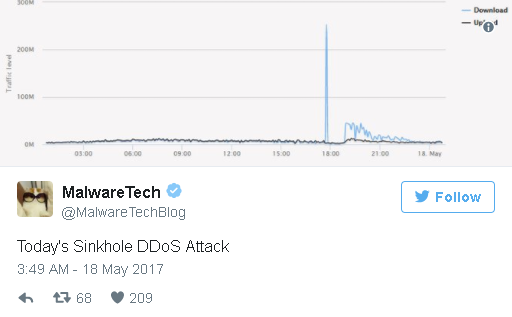
According to Wired, the KillSwitch is under DDoS attack and the attacks have peaked at 20 gigabits per seconds and are trending up. If they succeed, the inoperative WannaCry system will come back to life and begin to spread again.
Now a few devious hackers appear to be trying to combine those two internet plagues: They’re using their own copycats of the Mirai botnet to attack WannaCry’s kill-switch. So far, researchers have managed to fight off the attacks. But in the unlikely event that the hackers succeed, the ransomware could once again start spreading unabated.
“Pretty much as soon as it went public what had happened, one of the Mirai botnets started on the sinkhole,” says Marcus Hutchins, the British security researcher who registered the WannaCry kill-switch domain. Since then, he says, near-daily attacks from that first botnet and others built with the same Mirai malware have steadily ticked up in size and impact.
If the DDoS assault succeeds, WannaCry infections would immediately reignite. The ransomware stops scanning for new victims 24 hours after installing itself on a computer, says Matt Olney, a security researcher with Cisco’s Talos team. But anytime one of those infected machines reboots, it starts scanning again. “The ones that were successfully encrypted are in this zombie state, where they’re waiting to be reactivated if that domain goes away,” says Olney.
It must be noted that the second KillSwtich for WannaCry was identified by a French security researcher Matthieu Suiche but as of now, there is no indication if the KillSwitch domain owned by him is receiving DDoS attacks or not. However, the good news is that Suiche has come up with “wannakiwi,” a tool which helps users to clean their devices from WannaCry infection.
If your device has been infected with this nasty malware download ‘wannakiwi’ tool from here.
WannaCry Is Trying To Come Back From The Dead With The Help Of Mirai Botnet
By Unknown

Screenshots:

Kba Squad share a post about the second target:

HALK TV website when is offline:

Anonymous update the pastebin file:

Turkey Cyber Attack: Anonymous Shut Down More Turkish TV Channels
By Unknown

There are some screenshots from website


When the .24 TV was Live, Anonymous spam their chat with a lot of messages

Anonymous showing the pastebin text

Anonymous also claims: "We will attack CNN TURK after .24 Turkish Channel"

Kba Squad was also share a post on their FanPage about the cyber attacks


Anonymous and Kba Squad take the responsibility for Cyber Attacks on Turkish TV Channel
By Unknown
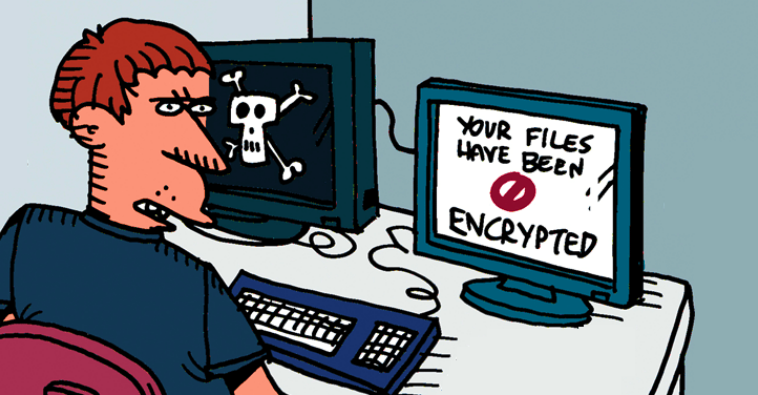
These malicious applications lurk around waiting for gullible web users to fall for their trap. Once the malware gets installed in the system, it effectively locks all the functions of your computer rendering your OS useless, until you pay the hacker a huge sum of money as ransom. The entire purpose of the ransomware threat is simple to extract money from you for restoring the data it has captured.
Some Scary Stats About Ransomware
- Since January 2016, there have been 4,000 ransomware attacks, that’s 300% increase as compared to data from 2015.
- In 2015, more than 25,000 enterprise users reported ransomware infections in their computers. A Kaspersky Labs report suggests that in 2016, the number rose to 158,000.
- A Webroot press release claimed that in 2015, close to 100,000 malicious IP addresses were being created every day, indicating how cybercriminals rely on changing identities.
Read on to know more about the dangers of ransomware and how to protect your computers from it:
The Do’s and Don’ts of Protecting Critical Data

Ransomware is not a new term for web developers and entrepreneurs; in fact, this online threat has been around for a quite a while now. It’s been around for a number of years; the first known version dates back to 1989. However, the current sophisticated ransomware that we see today popped up somewhere around 2010. Ransomware is a threat not just to people in business but also ordinary web users who’re online just to check their emails or their Facebook newsfeed. Listed below is a comprehensive list of dos and don’ts that every web users must follow so as to ensure that they never fall prey to ransomware:
- Install an anti-virus software and keep it updated
- Always keep the firewall activated on the browser
- Never share your personal information or any sensitive data online unless you are sure of the authenticity of the platform
- Never click on suspicious links or pop-ups that claim how your system is infected with malicious programs, and you need to ‘click’ to clean up.
- Keep a backup ready, in case your data gets lost
- Save your data on the cloud, it safeguards your files and makes data recovery easier.
- Keep the operating system and other crucial applications on your computer up to date.
What To Do If Ransomware infects your System?
In case you didn’t detect ransomware with siem, and your system does get infected, don’t panic. The list of rules mentioned above only ensure that your computer doesn’t fall prey to malware; it gives you no information on what to do if your system is already infected. Business enterprises, established organizations and web browsers – no one is spared from these malicious ransomware cyber minds.
You cannot undo what’s been done, but you do have control over your future course of action. We would now discuss the options a web user has when ransomware has compromised his account or system.
Do not, under ANY circumstance, pay the ransom!
Giving in to the demands of the hackers seems like the only practical option when the question of data security looms ominously in the background. However, that doesn’t necessarily have to be true. Paying ransom might seem like the easy way out but remember that doing so would only fuel their illegal activities and fund the attackers. Moreover, even if you end up paying the said amount, there is no guarantee that your files would be decrypted and restored safely. Caving into these criminals in the hope of returning the files held hostage only gives them leverage to use the information against you for future attempts of extortion.
So, What Should You Do?
The first and foremost thing that you should do is try removing the infected program from the server and safeguard your system. Each application has its own removal and deactivation process. These tutorials and help articles will give you a systematic, step-by-step guide on how to successfully remove the affected program without compromising on the security of your system. Note that the removal process works best when the system is disconnected from the network so as to minimize the risk of the ransomware spreading to other applications as well.
Once you have terminated the infected program, your next course of action should be to restore the data held by hackers. Using a good and reliable backup platform is the easiest way to reclaim the lost information. When your data gets attacked by ransomware there are two options that you can choose from- either pay the ransom (not recommended) or restore the data via backup. There is no third way out. You can snoop around online looking for “shadow copies” or variants of the original files, but even those are of no help as hackers today use advanced RSA-2048 bit encryption key that not even “brute force” can break into.
How Do You Safeguard Your Data?
Ransomware though possibly the most dangerous of online threats is nothing different from any ordinary malware if you look closely into its nature and functionality. Before we begin to talk about the various precautionary measures to protect your system against any ransomware, please note that the program spreads just like any other malware and needs an outlet, a weak point or a crack in your network through which it can infiltrate your system. Following safe browsing and computing practices and playing by the rules mitigates the risks of a ransomware attack. Mentioned below are some precautionary measures that every web user must adopt. It is better to be safe than sorry.
Always Be Suspicious
It is always better to be on the lookout for suspicious activities than be complacent and regret it later. Moreover, no malware programs today come with a warning or any such indication of their true nature; hackers are way smarter than that. Cyber minds are always updating their hacking standards using new and innovative technology to dupe customers. Most of the time the infected files and malicious malware comes disguised as an alert message or an unexpected email from your contact list. Never click on any attachment or hyperlink that seems fishy. Also in case, you notice any suspicious file or email that asks for your personal information or bank details, double check it with the source company or sender before you download the attachments or give away any such sensitive data. Think twice before you click on files with suspicious extensions such as .exe
Keep Your System Updated
The fact that ransomware acts like any other malware and spread the same way a virus would be encouragement enough to keep your operating system updated as per the latest standards. Keeping all the applications, software and other core programs on your system upgraded to the latest standards only decrease the chances of a ransomware infestation. The developers of a program release updates and bug regularly fix that slowly but steadily changes the basic functionality of the system. If you do not tweak the OS accordingly, your files automatically become susceptible to an online attack.
Run a Reliable Anti-Virus On The System
With constant updates and cloud backup support, it is tough for the ransomware malware to infiltrate your system. However, it is always safer if you also install a robust and reliable anti-virus system on your computer or mobile device. The anti-virus protection automatically deflects all Trojan programs, suspicious files and blocks any malware that might prove harmful for your system. Moreover, the cost of anti-virus software is any day less than the price you will have to pay in case your files are stolen by a dangerous program. Anti-virus programs like Quick heal and Avast also offer firewall services for safer web browsing.
Always Have Backup
If by any chance your system does get infected with ransomware and the security of your information is at stake, cloud-based storage can effectively save the day. Having a backup either on the cloud or any offline external memory device saves you the trouble of paying to access your own files. Creating multiple backups sounds like a smart solution for users who want to protect their data from ransomware and other threats. For instance, Synology Cloud Station backup is a good option to back up stored data of the PC with the NAS system. Here, you get the option of creating almost 32 versions of the same file!
The Best Security Hacks To Apply Now
Prevention is always better than cure; this holds true for all your online activities as well. Discussed below are the best security hacks of the year that every web user should apply right this moment to safeguard their files from ransomware and other virus threats.
Keep a Firewall Application With Web Merging Features
Installing a firewall is perhaps among the safest ways to protect your browser from any malware floating on the web. The firewall stands as a powerful barrier between the browser and your system, it meticulously checks and scans everything you download or install on your device from the internet. FortiGate, SonicWall, Untangle, UTM are among the top firewall programs that offer robust protection against ransomware. These applications are also known for blocking websites that have malicious content that can harm your system in any way.
A Centralized Anti-Virus Management Server
Anti-virus companies such as MacFree, Avast, and Sophos provide users with a centralized console for monitoring and managing your online and offline activities. This is an excellent feature for IT companies and multi-tier organizations that can now get all the notifications about the various departments on the local server as well as track the activities of a SaaS cloud-based platform in a single place. A more advanced version of the anti-virus also gives you the freedom to set up the trigger and execute them on the network accordingly restricting access or disabling certain sections as and when required. Ensure that the anti-virus is always up to date with the latest upgrades released in the market.
Ensure That User Accounts Have Minimum Rights
The ransomware attacks are typically sourced from end-user accounts and can enter the network even if any member of the network installs or clicks on a suspicious attachment. Not all users should be given the same level of freedom and access to the files and folders on the server. This is where the “principle of least privilege” comes into the picture. When you assign security permission and accessibility to end-users, give them the liberty and authority to access only those files that they strictly need to complete their assigned tasks. Doing so would drastically minimize the risk of ransomware. It is smarter to authorize a few trusted people in the organization than to open the network for everyone.
Setup Correct File and Folder Level Permissions
While a firewall ensures that your files are protected from any external threats looming on the server setting up various correct file and folder level permissions protect your data from any internal security threat. Adding permissions and passwords that restrict end-user access to certain files prevent the risk of them hoarding the data and asking you money in exchange for it. You can tweak the access points of the NTFS security system giving only certain trustworthy users the authority to access the files on the server. By doing so, you are automatically blocking all attempts by external parties to barge into your system and steal data.
Enable Creation of Volume Shared Folders on Shared Drives
Enabling the creation of volume shadow copies of the existing files and folder on the server is an added protection against ransomware that every organization should adopt. The shadow copies that you store on the shared network of the server can be accessed in case of a malware attack. Also depending on the way you store the files, the application also allows you to restore the files in their original form despite the changes made to them during the course of time (here the changes signify the attack of ransomware that encrypts files). The volume shadow copy feature comes pre-installed in the Windows OS. You can enable it from the File Explorer section.
Install File Screening
One of the easiest ways of ensuring that your system is protected from ransomware and other online threats is by setting up FSRM or File Server Resource Manager on your primary file server. It screens all the sites and information you access online and tracks your web presence. The system helps you monitor and control end-point access and restrict suspicious files and programs from entering the system via the main server. It minimizes the risk of a malware infestation by preventing the end users or clients from wreaking havoc on your system. FRSM scripted solutions allow you to trigger various policies that deflect the malware’s attempt at infiltrating your device.
Offline Backup and Data Security
Data backup doesn’t necessarily involve online storage solutions and cloud-based services. Sometimes it can also be about offline storage. However, that does not mean you store the information in the same system by creating a second base partition in the memory. That still renders the files vulnerable to a ransomware attack. No, what you need is a powerful and dependable offline storage solution that can give you unrestricted access to information in case of an emergency situation or on-site disaster. External hard disks, USB storage devices, and NAS devices are among the most popular off offline backup choices among users.
GPO Restrictions And Patching
Installing GPO restrictions on the network reflects not only ransomware but all kinds of malware and virus threats allowing you to use the network freely. It provides granular control assisting users in tracking the execution files right from their source to the end point. Therefore, by enabling GPO restrictions, you can easily block any suspicious activity and stop any malicious attachments from downloading automatically on the system. You even get the freedom to disable extensions and files from executing. Another method that you can use here is Patching, a technique that can be accessed from third party applications such as Java, Flash or Abode.
The Bottom Line
Like everything else, even the World Wide Web has its fair share of ups and downs. The technological developments though a boon for online ventures have also contributed to the growth of cyber crime. It has unfortunately also assisted hackers in creating nastier malware that can destroy the very foundations of your website. Moreover, the fact that ransomware has now started infecting Mac devices as well has only added on to the hype around it being the most dangerous of cyber crime tools out there.
How To Prevent Growing Issue of Encryption Based Malware (Ransomware)
By Unknown

Windows 7 is still by far the most common versions of Windows, running on roughly four times as many computers as Windows 10 worldwide. Since more recent version of Windows aren’t vulnerable to WannaCry, it makes sense that most of the infection would hit computers running 7. Still, the stark disparity emphasize how small of a role Windows XP seems to have played in spreading the infections, despite early concerns about the outdated operating systems.
The new figure also bear on the debate over Microsoft’s patching practice, which generated significant criticism in the wake of the attacks. Microsoft had released a public patch for Windows 7 months before the attack, but the patches for Windows XP was only released as an emergency measure after the worst of the damages had been done. The patch was available earlier to paying Custom Support customer, but most XP users were left vulnerable, each unpatched computers a potential vector to spread the ransomware further. Still, Kaspersky’s figure suggest that unpatched XP devices played a relatively small roles in the spread of the ransomwares.
Some help is already arriving for system infected by WannaCry. Because of sloppy coding, researcher have found that private system encryption keys can often be recovered from infected machines, allowing user to undo the damages done by the ransomwares. A researcher from Quark Security has published an automated tool to manage that processes, which should work for Windows 7, XP, Vista, and other affected version.
Latest Hacking News
Survey Reveals that Majority of WannaCry Victims are running Windows 7
By Unknown

Those visiting the site could see a message saying “Something is technically wrong. Thanks for noticing—we’re going to fix it up and have things back to normal soon.”

It must be noted that Twitter’s website and app both were affected by the outage however it remained unclear what really happened. The problem began at 6.18am BST and continued to affect users trying to Tweet, search or send direct messages.
Sven Hammar, Chief Strategy Officer at website testing and monitoring company Apica commented on the outage and said that:
“With over 300 million users, Twitter is used for essential communication around the world, so this outage will have long-term negative consequences for the brand. Millions of users have been affected for hours, with the site suffering outages in the UK, Spain, the Netherlands, Japan and parts of France and the US. While Twitter has acknowledged the problems, it is yet to communicate the reason for the downtime. Not only has the app itself failed – Twitter’s firefighting strategy has proved disappointing. In the event of an outage, marketing teams should have a proactive strategy in place for their customers to promptly communicate why the service degradation has occurred, and what measures are being taken to resolve it.”
According to Down Detector, a website keeping an eye on platforms suffering outages, there were more than 2000 reports of the outage earlier today while some users who were able to post showed their frustration in their own way.


At the time of publishing this article; Twitter was back in some countries while some users reported that they still can’t access the site.
Source: http://hackread.com/
You were not alone; Twitter went down everywhere
By Unknown
Subscribe to:
Posts (Atom)